
The Tellenze platform
One workspace.
Fewer loose ends.
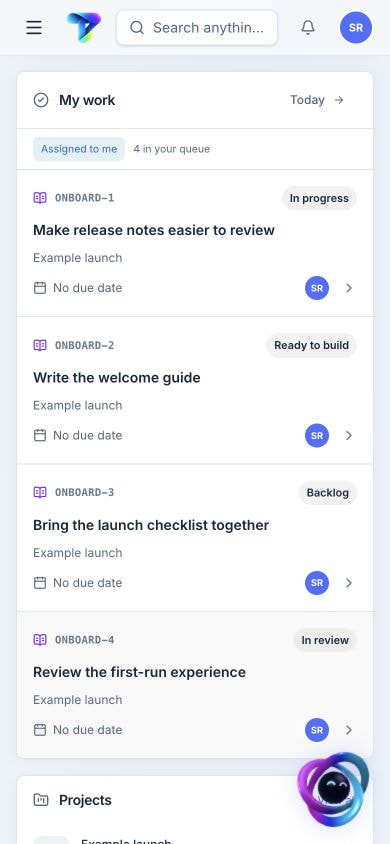
Plan projects and requests with a clear brief. People and connected agents can use the context their access allows, while decisions and next steps stay with the work.
Meet the platform
Your work, agents and knowledge.
Finally connected.
Keep the request, its guidance and the contributions in one place. Use a rule for repeatable steps, then bring the review and what you learned into the next piece of work.
MAKE A PLAN
Know what’s next. And why.
Bring projects, priorities and people together. Follow each task back to the reason you’re doing it.
Work managementA LITTLE EXTRA HELP
Make room for your agents.
Ask Looper a question, connect your own agents and automate the repeatable bits. You keep the deciding vote.
Agents & automationKEEP THE GOOD BITS
Find it. Use it. Pass it on.
Keep guides, decisions and discussions with the work. Give the next person a head start, without another handoff meeting.
Knowledge & contextBETTER NEXT TIME
Make the lesson stick.
Review what happened, talk it through and turn a useful discovery into a real next step.
Learning & insightsSignals · Observe and respond
Find the work
in the noise.
Customer reports, service alerts and application errors can tell the same story. Bring them together, review Looper’s suggestions and keep the evidence connected to the work.
Explore SignalsFrom scattered reports to a shared signal.
Capture text, links and metadata through the web, Apps/API, MCP or Looper. Group related evidence and keep the original sources.
A suggestion your team can review.
Discuss the evidence, mention teammates and Looper, then accept suggested work or link an existing item.
A resolution you can come back to.
Follow progress, confirm the outcome and connect later reports to earlier signals. Available on Starter and above.
A hand with the work
Extra help.
With you in charge.
Ask Looper a question or connect the agents you already use. They work with the context you can access; you stay in the conversation.
Meet Looper and connected agentsHelp, right where you work.
Ask Looper in the workspace, from Spotlight or in a work-item conversation. Review proposed changes before applying them.
Your agents. Shared context.
Connect compatible clients through the Model Context Protocol. Required Context brings reviewed guidance to supported agent actions.
A contribution you can follow.
Retain the person, agent or automation behind an action. Use machine profiles and companion reactions for connected research and coordination.
Fits into your day
Less copying things
from one place to another.
Delivery, within reach.
Bring GitLab branches, commits, merge requests and pipeline status alongside project work. Link the evidence to the item it belongs to.
Good processes, ready to repeat.
Start with versioned templates. Preview scoped automation rules for assignment, status, reminders and notifications, then follow their run history.
A little more clarity
A few things you might be wondering.
Who is Tellenze for?
Teams with different skills and something to build together. Designers, developers, product people, analysts and customer teams can share a plan, keep the context close and see how their work connects.
Do we need to work in sprints?
No sprint calendar required. Plan around the milestones and focus groups that suit your team. When it’s time to review or reflect, choose the work and dates you want to look at.
Can we keep our own workflows?
Yes. Keep the stages that make sense for your projects, then choose a board or list view. Save the useful patterns as templates, and give each team a view that fits.
How do people stay in control?
You review Looper’s proposed changes before applying them. Connected agents only get the access their connection allows, and you can see who—or what—contributed. Required Context brings your reviewed guidance to supported agent actions.
Can we start using Tellenze today?
We’re opening up early access. Join the waitlist and we’ll keep you posted on availability and product news. Joining the list doesn’t create a workspace yet.
COME TAKE A LOOK
A little less busy.
A lot more together.
Curious? Leave your email. We’ll keep you posted on early access and what’s new.