Keep the whole initiative together.
Group products and initiatives into portfolios. Keep their work, documentation and delivery context close.
 Tellenze
Work management
Plan the project, share the priorities and keep the details together. Everyone can see what needs doing—and what it’s meant to achieve.
Follow the thread
Name the problem and agree how you’ll know the work helped.
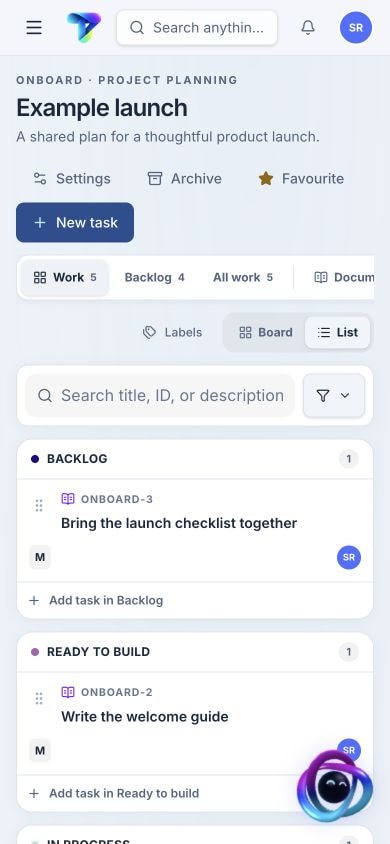
Everything in view
Board person? List person? Either way, see what’s moving, what’s waiting and what needs a hand.
Keep the why in sight
A task makes more sense when you can follow it back to the goal. Keep that connection when the plan changes.
Record expected impact, costs and success criteria. Link the contributing work, then compare the forecast with actual outcomes.
Bring related work together around a target. See progress, changing scope and delivery confidence, with the signals behind the forecast.
Give a cross-disciplinary effort a common direction. Organize active work around focus groups while upcoming priorities stay in the backlog.
Your team. Your perspective.
Group products and initiatives into portfolios. Keep their work, documentation and delivery context close.
Bring team work and owned projects into one place, with multidisciplinary contributors and clear ownership.
Save useful filters or curate a collection. Switch between board and list, then share the view with your team.
The whole story, in the work item
Keep the definition, the discussion and the decisions together. Give the next person or agent a useful starting point.
See how context travelsA rhythm that fits
Define stages to suit each project. Move work through familiar board or list views.
Use versioned templates for projects, milestones and work items. Preview what will be created before applying it.
Choose what deserves attention across assigned and watched work. Reflect on the week and bring the learning into the next.
Custom forms
Create forms for a team, project or Signals. Choose the fields you need and make each answer required or optional.
Compare form allowancesLet anyone submit through a public link, or keep a private form available only to signed-in workspace members.
Embed a public form in a frame so people can send requests without leaving your site.
Form capacity is shared across the workspace. Archive forms you no longer need while retaining the submitted work.
Before the work begins
Refine together. Surface the questions. Give the team a clearer place to start.
Explore refinement roomsCOME TAKE A LOOK
Curious? Leave your email. We’ll keep you posted on early access and what’s new.