
People and agents
A little more help.
A lot more context.
Ask Looper about the work, or connect an agent you already use. Give it the right context and keep the decisions with your team.

Meet Looper
Ask the question.
Skip the recap.
Looper can look through the projects, work and documents you can access. Ask it to find an answer, explain a decision or suggest a next step.
Right where the work happens.
Chat in the workspace, ask from Spotlight or bring Looper into a work-item discussion with a mention.
The relevant pieces, together.
Find related work and documents, summarize what matters and keep useful context connected to the task.
You review. Then it acts.
See proposed changes in the conversation. Approve the ones you want, with current access and context checked when they are applied.
The work, explained
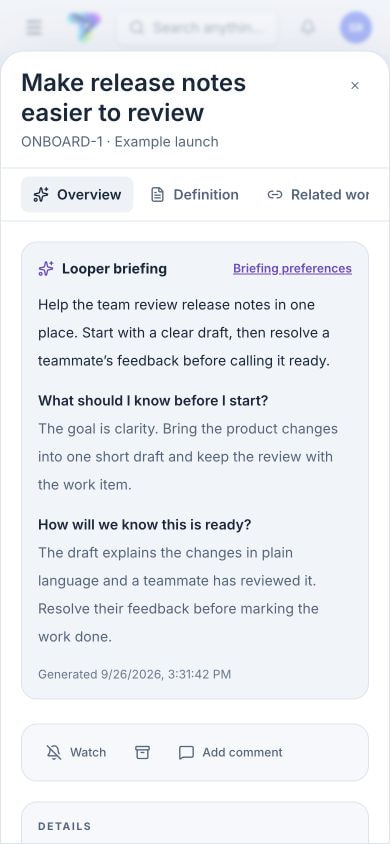
Get up to speed.
Right in the work item.
The Overview brings a summary and linked answers into the work item they explain. Get the context before choosing the next step.
Bring the agents you work with
Your favorite agents.
Part of the team.
Connect compatible agents through the Model Context Protocol. Give them an interface to the shared work, knowledge and discussions.
Shared work and knowledge.
Discover projects, teams and views. Read work items, manage focus, contribute to documents and participate in discussions.
Connections with a home.
Use named machine profiles and repository mappings. Local companions for macOS and Windows connect supported agent sessions to the work.
Access that follows the person.
Connections act within the member’s access. Required Context and attributed activity keep supported actions connected to the guidance and person behind them.
A little help, in the conversation
Ask for help
without leaving the thread.
Tag a teammate and @agent to ask their configured companion for help. A bounded session can investigate, clarify, summarize and create follow-up work, then bring its answer back.
Reaction sessions support research and coordination. Repository implementation stays in the contributor’s development workflow.
Illustrative conversation · Reporting proposal
Make the repeatable parts flow
Let the routine bits
look after themselves.
Choose an event, narrow the conditions and define a workspace action. Preview the effect, enable the rule and follow its run history.
A work item becomes blocked
Notify the coordinator so the dependency gets attention.
A linked GitLab pipeline succeeds
Complete the associated work through a reviewed rule.
A new bug is created
Add a watcher or assign the right people for triage.
A clear view of every contribution
See what your agents
have been doing.
Follow reaction progress, pause or cancel a run and retain its attempt history. Configure who can request reactions, when they run, and optional usage, budget and notification preferences.
See reported model, reasoning effort and token usage alongside work items. Direct measurements and allocations remain distinct, with missing data shown honestly.
Explore context and authorshipCOME TAKE A LOOK
A little less busy.
A lot more together.
Curious? Leave your email. We’ll keep you posted on early access and what’s new.